It’s 2 AM. Your phone buzzes. PagerDuty is screaming at you because the primary application server is “unreachable.”
Your first instinct might be to SSH into the box and start restarting services blindly. Don’t do that.
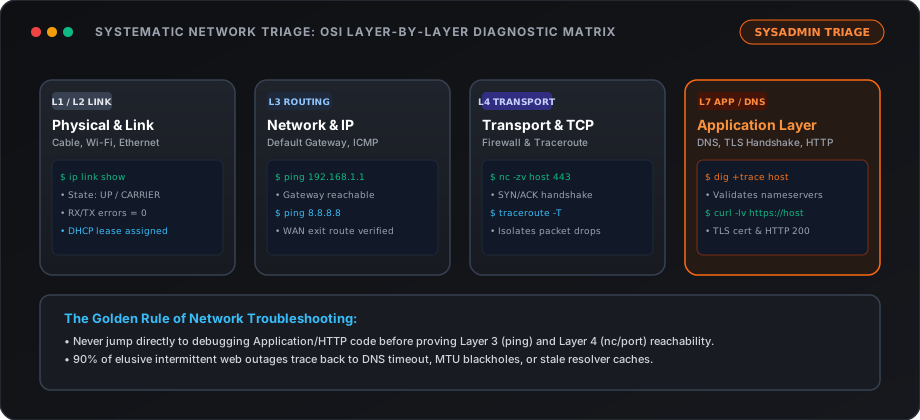
Over the years, I’ve learned that 90% of “complex” network outages are actually just simple misconfigurations masquerading as disasters. When things break, you need a system.
Here is the exact, step-by-step checklist I use before I even think about restarting a server.
Step 1: Is it DNS? (It’s Always DNS)
There’s an old sysadmin joke: “It’s never DNS. Wait, it was DNS.”
Before you start checking routing tables, make sure the domain is actually resolving to the correct IP. Did someone accidentally change an A record? Did a domain registration expire?
The Fix: Run the domain through a Full Domain Audit. Check the A and AAAA records. If the apex domain resolves but a secondary microservice or app is unreachable, use the subdomain finder to confirm the specific hostname is registered and resolves to the right IP. If records don’t match what you expect, stop troubleshooting the server—your problem is at the registrar or DNS host.
Step 2: The ICMP Ping (Is the Box Alive?)
If DNS is fine, we need to know if the machine is even powered on and connected to the network.
The Fix: Ping it. If you get a response, the server is up, and the network path is (mostly) clear. If it drops, you either have a routing issue, a firewall blocking ICMP, or the server is genuinely dead.
Step 3: Check the Ports
Okay, the server is alive. But is the application actually listening?
Just because a server responds to a ping doesn’t mean Nginx or Apache is running.
The Fix: You need to check specific ports. Is port 80 (HTTP) or 443 (HTTPS) open? If the port is closed, your application crashed or a local firewall (like ufw or iptables) is blocking it. If the port is open but the site won’t load, you have an application-level error (like a 502 Bad Gateway).
Step 4: The SSL Certificate Reality Check
I cannot tell you how many “critical outages” were just an expired Let’s Encrypt certificate. If your cert expires, modern browsers will throw a terrifying red warning screen that makes users think your site was hacked.
The Fix: Use an SSL Checker to verify the certificate’s validity and expiration date. If it expired, run your certbot renewal script and set a calendar reminder to fix your cron jobs tomorrow.
Step 5: Check the Neighborhood (IP Blacklists)
If your app is running fine but users are complaining that their emails from your server are bouncing, or they can’t access your API from certain networks, your IP might have a bad reputation.
The Fix: Run your server’s IP through an IP Blacklist Checker. If you’re on a shared host or someone compromised your box to send spam, you might be on a Spamhaus list.
Keep Your Tools Sharp
Troubleshooting under pressure is hard. That’s exactly why I built The Network Tools. I got tired of juggling terminal commands across different OS environments at 2 AM.
Next time things break, take a breath, follow the checklist, and let the tools do the heavy lifting.
Stay Ahead on Protocol Changes
Get our authoritative engineering deep dives on Gmail/Yahoo bulk sender rules, post-quantum TLS, and DNS standards directly in your inbox. No marketing fluff.
Maximum 1 email per week · Unsubscribe with 1 click
Related tools
View all toolsDNSSEC Validator
Free DNSSEC validator. Verify the cryptographic chain of trust from ICANN root down to zone apex. Inspect DS records, DNSKEY public keys, and RRSIG validity.
DNS Time Machine
Free DNS Time Machine. Track DNS record changes with git-style visual diffs (+/-) and export standard RFC 1035 BIND zone files for 1-click disaster recovery.
DNS Propagation
Free global DNS propagation checker. Test A, AAAA, CNAME, MX, and TXT records across 12 worldwide edge locations with expected value matching and Geo-DNS detection.